Re-engaging Stalled learners
As a frontend software engineer at Coursera, I work on maintaining and experimenting on the homepages. Coursera has millions of learners who start courses but never go back to finish them. This project explored two AI-powered interventions to bring them back: a personalized recap of where they left off, and a contextual AI coach to help them figure out what to do next. I implemented and shipped both to production as A/B experiments.

Before
After
The problem
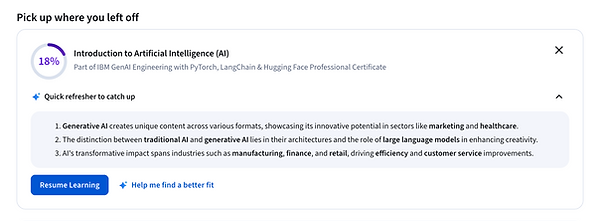
Learners are starting courses but not following through. We aimed to explore how to re-engage them and why they are no longer interested. Returning to a course after weeks away is disorienting and unmotivating— you don't remember what you learned, or why you cared. We hypothesized that reducing that re-entry friction by providing a quick summary could meaningfully lift resumption rates.
AI Recap

We built a system that generates a personalized 3-point recap for each stalled learner, surfaced on the Coursera homepage. A daily job pulls pre-saved AI-generated course atom summaries and sends them to GPT to generate a markdown recap, stored per user in DynamoDB. Pre-generation was a deliberate tradeoff — it introduced some waste but eliminated homepage latency from waiting on an LLM at request time.
One of the more interesting design decisions was around translation. The recap prompt is in English but course content can be in any language. We weighed on-request translation, a UI toggle, pre-translation by locale, and language detection from course language — each with different accuracy, cost, and complexity tradeoffs. For the sake of the experiment we decided to keep it scoped by locale to English speakers.
On the frontend, when a user dismisses their recap we didn't want to force a full data refetch while the backend mutation processed. So we fake-hide the component on the FE immediately, letting the backend catch up in the background — a small detail that kept the experience feeling fast.
AI Coach
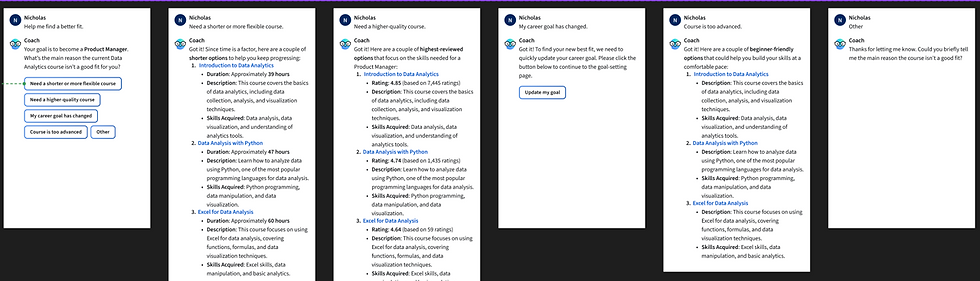
In order to gather information about why a learner is no longer interested in their course and provide them with more aligned options we added a chatbot onto the homepage. We shipped a contextual AI coach that is powered by GPT and uses a mode/action system: the FE passes a CoachModeId and ActionId that map to specific prompt configurations on the backend. Each prompt follows a consistent structure — persona and objective, context injection, tone specifications, and guardrails.
The five quick-reply options are hardcoded on the FE rather than LLM-generated to keep the UI predictable. Through prompt tuning we have specific instructions on which BE tool to call for each of the available options. There was an existing tool for fetching keyword based content recommendations and we added one to recommend based on similarity. Once we got the recommended product we called our course API to get the specific details and sort by category in the response. We used Braintrust to run evaluations against real course data, testing similarity-based vs. keyword-based recommendation tool calls within the prompt.
One tricky detail: for the "update my goal" flow, we needed the redirect to happen in the same tab with a specific link format. The LLM was inconsistent at formatting HTML links correctly, so we hardcoded that path and redirected to our onboarding flow rather than relying on the model to produce it.
Results and Learnings
The A/B test results showed small engagement gains but not the enrollment lift we were targeting, and chat usage was very low. The low chat usage pointed to a discoverability problem more than a quality one — a useful signal for where to invest next. These experiments are a good example of using rapid production testing to make fast investment decisions rather than building out full systems before validating demand.
My Role
I led the frontend build across both features, working closely with a PM, designer, and backend engineer. I used AI throughout — not just to write code faster, but to scope how components should interact within our existing system before writing a line, and to iterate quickly on visual style and layout. The fake-hide UX pattern, the hardcoded quick-reply decision, and investing time to create a new recs tool were all decisions I was directly involved in making.